Best Budget Gaming Laptops Under $1000 That Actually Perform in 2026
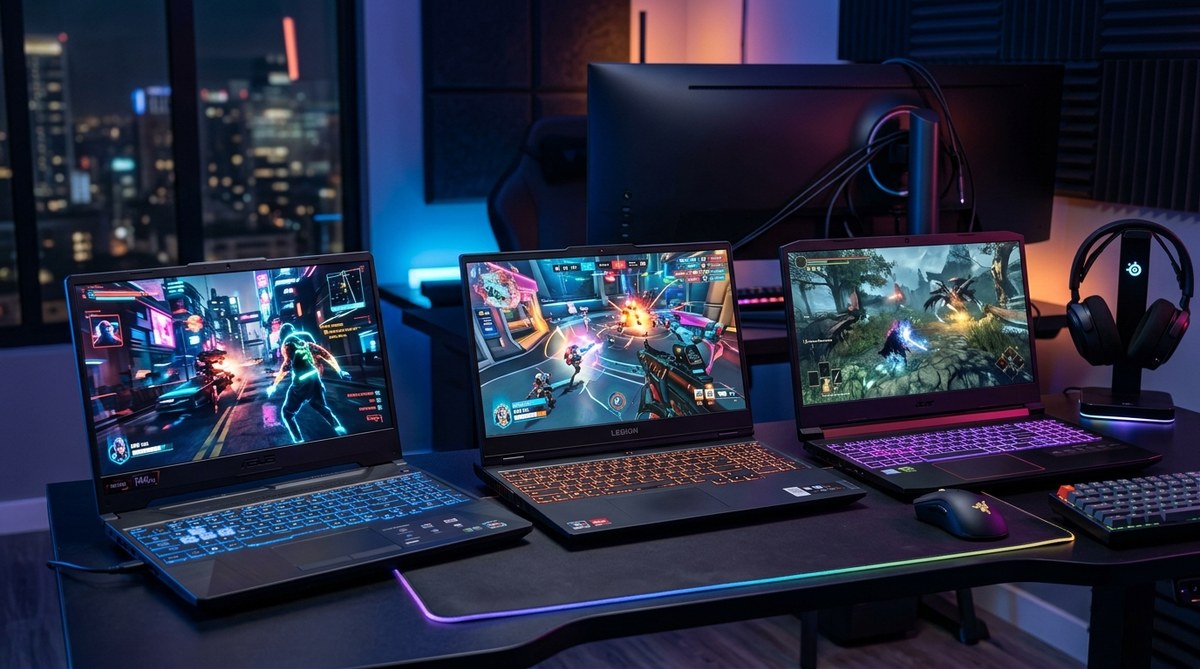
Gaming on a budget doesn’t mean settling for slideshow frame rates or machines that sound like jet engines. The sub-$1000 laptop market has changed dramatically in 2026, with manufacturers finally understanding that gamers want performance, not just RGB lights and aggressive styling. You can now get machines that handle Cyberpunk 2077 at medium settings, stream to Twitch without stuttering, and last through a full study session without hunting for an outlet.
Budget gaming laptops under $1000 now feature RTX 4050 or AMD Radeon RX 7600M graphics, 16GB RAM, and high-refresh displays. Prioritize GPU performance over flashy features. Expect 1080p gaming at medium to high settings for most 2026 titles. Battery life remains the biggest compromise, averaging 3-4 hours for non-gaming tasks. Check thermal performance reviews before buying, as cooling separates good budget machines from overheating disasters.
What Makes a Budget Gaming Laptop Worth Buying in 2026
The definition of “budget gaming” has shifted. Three years ago, $1000 got you entry-level hardware that struggled with anything beyond esports titles. Now that same budget lands you legitimate mid-range performance.
The sweet spot sits between $800 and $950. Below that, you’re making too many compromises. Above it, you enter territory where saving another $200 gets you significantly better hardware.
Modern budget gaming laptops should meet these minimum standards:
- Dedicated GPU with at least 6GB VRAM
- 16GB RAM (8GB struggles with modern games)
- 1080p display with 120Hz or higher refresh rate
- SSD storage of 512GB minimum
- Decent cooling that doesn’t sound like a leaf blower
The GPU matters most. Everything else can be upgraded or worked around, but you’re stuck with whatever graphics card ships in the box.
Performance You Can Actually Expect
Let’s be realistic about what these machines deliver. You won’t max out settings in every new release, but you’ll play everything that matters.
AAA Games (2024-2026 Releases)
Most recent demanding titles run at 1080p with medium settings between 45-60 fps. Games like Starfield, Alan Wake II, and Avatar: Frontiers of Pandora are playable with some graphics adjustments. Turn off ray tracing unless you enjoy watching PowerPoint presentations.
Competitive Multiplayer
This is where budget laptops shine. Valorant, Counter-Strike 2, Apex Legends, and Fortnite easily hit 100+ fps on high settings. The high-refresh displays actually matter here, giving you smooth gameplay that feels responsive.
Older AAA Titles
Games from 2020-2023 run beautifully. Red Dead Redemption 2, Elden Ring, and God of War hit high settings with 60+ fps consistently. Your backlog becomes very playable.
Similar to how to speed up your Windows 11 PC without buying new hardware, optimizing in-game settings makes a huge difference in performance without spending extra money.
Top Specs to Prioritize on a Tight Budget
Not all specifications deserve equal attention. Here’s where your money should go.
Graphics Cards Worth Considering
The GPU determines gaming performance more than any other component. In 2026, these options dominate the budget space:
| GPU | VRAM | Best For | Average Price Range |
|---|---|---|---|
| RTX 4050 | 6GB | Balanced 1080p gaming | $850-$950 |
| RTX 4060 | 8GB | High settings 1080p | $950-$1050 |
| RX 7600M | 8GB | Raw performance value | $800-$900 |
| RTX 3060 | 6GB | Last-gen deals | $700-$800 |
The RTX 4050 offers the best balance. It handles DLSS 3 frame generation, which genuinely helps in demanding games. AMD’s RX 7600M trades ray tracing performance for better rasterization, meaning traditional games run faster.
RAM and Storage Considerations
16GB RAM is non-negotiable. Games like Hogwarts Legacy and Starfield stutter with 8GB, and Windows itself consumes 4-5GB just sitting idle.
Storage gets tricky. Most budget laptops ship with 512GB SSDs. That holds your OS, essential programs, and maybe five large games. Plan to either:
- Uninstall games you’re not actively playing
- Buy an external SSD for your library
- Check if your laptop has an empty M.2 slot for expansion
Some manufacturers save money with slower PCIe Gen 3 drives instead of Gen 4. For gaming, you won’t notice much difference in frame rates, but load times suffer slightly.
Display Quality Matters More Than You Think
A 120Hz display transforms how games feel. Even if you’re only hitting 70 fps, the smoother refresh rate makes everything more responsive than a 60Hz panel.
Color accuracy matters less for gaming than brightness and response time. Look for:
- At least 300 nits brightness
- IPS panel (avoid TN panels entirely)
- 5ms or faster response time
- Matte finish to reduce glare
Some budget laptops cheap out with 1080p 60Hz displays. Skip them. The $50-75 premium for high refresh pays off every single gaming session.
Cooling and Build Quality Red Flags
Budget laptops cut costs somewhere. Make sure it’s not thermal management.
Overheating causes performance throttling, where your laptop deliberately slows down to avoid damage. A machine with great specs that thermal throttles performs worse than a cooler laptop with slightly weaker hardware.
Warning signs of poor cooling:
- Single fan designs (dual fans are essential)
- Plastic bottom panels with minimal venting
- Reviews mentioning loud fan noise under light loads
- CPU temperatures above 95°C during gaming
Build quality varies wildly at this price point. Plastic chassis flex and creak but stay functional. Metal builds feel premium but can get uncomfortably hot. The keyboard and trackpad matter more than materials since you’ll use them constantly.
Test the keyboard before buying if possible. Mushy keys with short travel make typing assignments after gaming sessions miserable. The trackpad should be responsive, though most gamers use external mice anyway.
Battery Life Reality Check
Gaming laptops and long battery life are natural enemies. The powerful components that make games playable drain batteries fast.
Expect these real-world numbers:
- Gaming on battery: 1-2 hours maximum
- Web browsing and documents: 3-5 hours
- Video streaming: 4-6 hours
- Idle with screen on: 6-8 hours
Always game while plugged in. Battery gaming not only dies fast but also triggers power-saving modes that tank performance. Some laptops won’t even use the dedicated GPU on battery power.
The battery consideration matters most for students. Can your laptop survive three back-to-back classes without charging? Probably, if you’re taking notes and browsing. Streaming lectures during lunch break will push it close.
Just like why your smartphone battery degrades faster than it should, laptop batteries lose capacity over time, especially when regularly drained to zero or kept at 100% charge constantly.
Common Mistakes Budget Buyers Make
Avoid these traps that waste money or leave you with buyer’s remorse.
Mistake 1: Buying Last Year’s Flagship Instead of This Year’s Mid-Range
That 2024 high-end laptop for $999 looks tempting, but 2026 mid-range hardware often performs better while running cooler and using less power. Technology moves fast.
Mistake 2: Prioritizing Storage Over GPU
A laptop with a 1TB SSD but RTX 4050 loses to a 512GB model with RTX 4060. Storage is cheap and easy to add externally. GPUs are permanent.
Mistake 3: Ignoring Warranty and Return Policies
Budget laptops have higher defect rates. Buy from retailers with hassle-free returns. Extended warranties actually make sense here, unlike on premium devices.
Mistake 4: Falling for “Gaming” Marketing on Non-Gaming Hardware
Red accents and aggressive styling don’t equal performance. Some manufacturers slap “gaming” on regular laptops with integrated graphics. Always verify the actual GPU model.
Mistake 5: Buying Without Checking Upgrade Options
Can you add more RAM later? Is there a second M.2 slot? Some budget laptops solder everything, making future upgrades impossible. Others leave room to grow.
How to Evaluate Deals and Sales
Timing your purchase saves serious money. Gaming laptops see predictable discount patterns.
Best buying windows:
- Back-to-school sales (July-August): Retailers target students with genuine discounts
- Black Friday through Cyber Monday: Expect $100-200 off, but popular models sell out fast
- New GPU launch periods: Previous generation hardware drops in price
- End of quarter sales: Manufacturers clear inventory for new models
Red flags that a “deal” isn’t really a deal:
- The laptop never sold at the “original” price being crossed out
- Specs are suspiciously vague or missing key details
- Brand you’ve never heard of with zero professional reviews
- Price seems too good compared to similar models (usually means refurbished or older stock)
Check price history using browser extensions before buying. That “$899 down from $1299” deal might have been $899 for the past six months.
Real-World Gaming Scenarios
Let’s map budget laptop performance to actual gaming situations you’ll encounter.
Scenario: College Dorm Gaming
You’re gaming on a desk in a shared room. Noise matters because your roommate is studying. Performance matters because you’re playing with friends online who have better hardware.
Best choice: Laptop with good cooling that stays relatively quiet under load. The RTX 4050 models from Lenovo or ASUS balance performance and acoustics well.
Scenario: Weekend LAN Parties
You’re hauling your laptop to a friend’s place every few weeks. Weight and build quality matter. You need something that survives being stuffed in a backpack.
Best choice: Slightly smaller 15-inch models under 5 pounds. The performance hit compared to 17-inch beasts is minimal, but your back will thank you.
Scenario: Gaming and Content Creation
You game but also edit videos for your YouTube channel or design projects for class. You need CPU power alongside GPU performance.
Best choice: Look for AMD Ryzen 7 or Intel Core i7 processors. The extra cores help rendering times significantly. Budget laptops with i5 or Ryzen 5 chips struggle with heavy multitasking.
Software and Settings Optimization
Getting the most from budget hardware requires some tweaking. These adjustments cost nothing but improve performance noticeably.
Windows Optimization Steps:
- Disable startup programs you don’t need
- Set power plan to “High Performance” when gaming
- Keep GPU drivers updated (check monthly)
- Disable Windows visual effects for better performance
- Close background apps before launching games
In-Game Settings to Adjust First:
Start by lowering these settings, which tank performance without improving visuals much:
- Shadows (medium instead of ultra saves 15-20 fps)
- Anti-aliasing (use DLSS or FSR instead of traditional AA)
- Ambient occlusion (turn off or use lowest setting)
- Motion blur (disable completely, it’s awful anyway)
- Depth of field (disable for better visibility)
Resolution scaling technologies like DLSS 3 or AMD FSR 3 are game-changers. They render games at lower resolution then upscale intelligently, giving you 30-40% better frame rates with minimal visual loss.
When to Consider Refurbished or Open Box
Certified refurbished gaming laptops stretch your budget further, but come with risks.
Refurbished models typically cost 15-25% less than new. That $950 laptop becomes $700-800, potentially letting you afford better specs.
Only buy refurbished if:
- It comes with at least a 90-day warranty
- It’s from the manufacturer or authorized refurbisher
- Return policy matches new products
- You can verify the exact specs and condition
Avoid refurbished laptops if:
- Battery health isn’t disclosed (worn batteries are common)
- It’s being sold “as-is” with no warranty
- The seller has poor ratings or reviews
- You can’t determine how old the model is
Open-box items from major retailers offer better deals with less risk. Someone bought it, returned it within the return window, and now it’s discounted 10-20%. You get essentially new hardware for less.
Accessories Worth the Extra Investment
Your laptop budget shouldn’t consume every dollar. These accessories genuinely improve the gaming experience.
Cooling Pad ($25-40)
External cooling pads with large fans drop temperatures 5-10°C. Lower temps mean better sustained performance and longer laptop lifespan. Worth it if you game for hours at a time.
External Mouse ($30-60)
Gaming on a trackpad is torture. A decent wired gaming mouse with adjustable DPI makes aiming in shooters actually possible. Wireless mice cost more but eliminate cable clutter.
Laptop Stand ($20-35)
Raising your laptop improves airflow underneath and creates better ergonomics. You’ll notice less neck strain during long sessions.
External Storage ($50-80 for 1TB SSD)
Games keep getting bigger. An external SSD gives you room to keep your full library installed. Modern USB 3.2 drives load games nearly as fast as internal storage.
Similar to budget smartwatches that actually compete with premium models, smart accessory choices can dramatically improve your overall experience without breaking the bank.
Brands That Deliver Real Value
Not all gaming laptop manufacturers treat budget buyers equally. Some cheap out on everything, others make smart compromises.
Lenovo Legion Series
The LOQ and Legion 5 lines consistently offer solid performance with good cooling. Build quality feels premium for the price. Keyboards are comfortable for typing between gaming sessions.
ASUS TUF Gaming
TUF models sacrifice aesthetics for durability and performance. They’re chunkier and less stylish but run cool and last. Military-grade durability testing actually means something here.
Acer Nitro Series
Nitro laptops maximize raw specs for the dollar. The tradeoff is louder fans and more plastic in the build. Great if performance per dollar is your only concern.
HP Victus
Newer to gaming laptops but competitive. Victus models have surprisingly good displays and reasonable cooling. The design is understated, which some prefer over aggressive gaming aesthetics.
Brands to Approach Carefully
Some manufacturers have inconsistent quality control at budget prices. Read professional reviews for specific models rather than trusting the brand name alone.
Your Gaming Laptop Will Be Your Workhorse Too
Gaming laptops pull double duty. That machine needs to handle assignments, video calls, and productivity work alongside gaming.
The good news is gaming specs translate well to other tasks. That powerful GPU accelerates video editing and 3D rendering. The high-refresh display makes scrolling documents smoother. The fast SSD loads applications instantly.
The bad news is gaming laptops are:
- Heavier than ultrabooks (expect 5-6 pounds)
- Bulkier (won’t slide into slim laptop sleeves)
- Louder when fans spin up during video calls
- Shorter battery life for all-day classes
Consider whether you need one machine for everything or if a budget gaming laptop plus a cheap tablet for classes makes more sense. The tablet route costs more total but gives you all-day battery for notes and a powerful gaming rig at home.
Making Your Budget Laptop Last
A $900 laptop should serve you well for 3-4 years if you treat it right.
Maintenance That Matters:
Keep the vents clear of dust. Compressed air every few months prevents thermal buildup. Gaming laptops inhale dust like vacuum cleaners.
Don’t game on soft surfaces like beds or couches. Blocking bottom vents causes overheating. Use a desk or lap desk with ventilation.
Keep your SSD at least 20% free. Completely full drives slow down and wear faster. Uninstall games you finished instead of hoarding them.
Update drivers regularly but don’t install beta versions. Stick with stable releases unless you’re troubleshooting specific issues.
Consider repasting thermal compound after 18-24 months. Factory thermal paste dries out, reducing cooling efficiency. This is advanced but makes a noticeable difference.
When to Upgrade vs Replace:
Adding more RAM is worthwhile if your laptop supports it. Going from 16GB to 32GB helps with multitasking and future-proofs slightly.
Upgrading storage makes sense. Adding a second SSD costs $60-100 and takes 10 minutes.
Replacing the battery after 2-3 years extends usable life significantly. Batteries degrade naturally, and replacements cost $60-100 for most models.
Don’t bother upgrading the GPU. It’s not possible in laptops. When your GPU can’t handle new games at acceptable settings anymore, it’s time for a new machine.
Finding the Right Machine for Your Gaming Style
Your game preferences should influence which laptop you choose.
Competitive Multiplayer Focus
Prioritize high refresh rate displays (144Hz minimum) and consistent frame rates over visual fidelity. The RTX 4050 handles esports titles easily. Make sure the keyboard has good key travel and responsiveness.
Story-Driven Single Player
You want better visuals and don’t mind 45-60 fps. Invest in better GPU performance (RTX 4060 if possible) and a color-accurate display. Screen size matters more for immersion, so consider 16-inch models.
Variety Gamer
You play everything from indie platformers to AAA releases. Balanced specs serve you best. RTX 4050, 16GB RAM, and 144Hz display hits the sweet spot. Don’t min-max for any specific genre.
Streaming and Content Creation
You need CPU power alongside GPU. Look for Ryzen 7 or Core i7 processors. Make sure you have good webcam quality or budget for an external camera. Consider 32GB RAM if you stream while gaming.
The Performance Sweet Spot Today
After testing dozens of models and tracking prices for months, the best value sits at $880-920. This range gets you:
- RTX 4050 or RX 7600M graphics
- Ryzen 7 or Core i7 processor
- 16GB DDR5 RAM
- 512GB NVMe SSD
- 15.6-inch 144Hz display
- Dual-fan cooling system
Spending less means compromising on specs that genuinely impact gaming. Spending more enters territory where you should save another $200-300 for significantly better hardware.
The market changes constantly. Prices drop when new GPUs launch. Sales happen during predictable windows. Sign up for price alerts on models you’re interested in rather than buying impulsively.
Why These Machines Actually Deliver
Budget gaming laptops earned their bad reputation through years of disappointing hardware. Manufacturers would slap “gaming” labels on machines with integrated graphics and call it a day.
2026 is different. The combination of more efficient GPUs, better cooling solutions, and competitive pressure created a market where $900 actually buys legitimate gaming performance.
You won’t match desktop performance at this price. You won’t run everything at ultra settings. You will play every game that matters at settings that look good and feel smooth.
That’s the realistic promise of budget gaming laptops today. Not perfection, but genuine capability at a price that doesn’t require selling a kidney.
Your first gaming laptop doesn’t need to be your dream machine. It needs to let you play with friends, experience the games everyone’s talking about, and last through a few years of college or your first job. These machines do exactly that without the buyer’s remorse that plagued budget gaming laptops of the past.


Post Comment