How to Spot a Fake USB-C Cable Before It Ruins Your Device
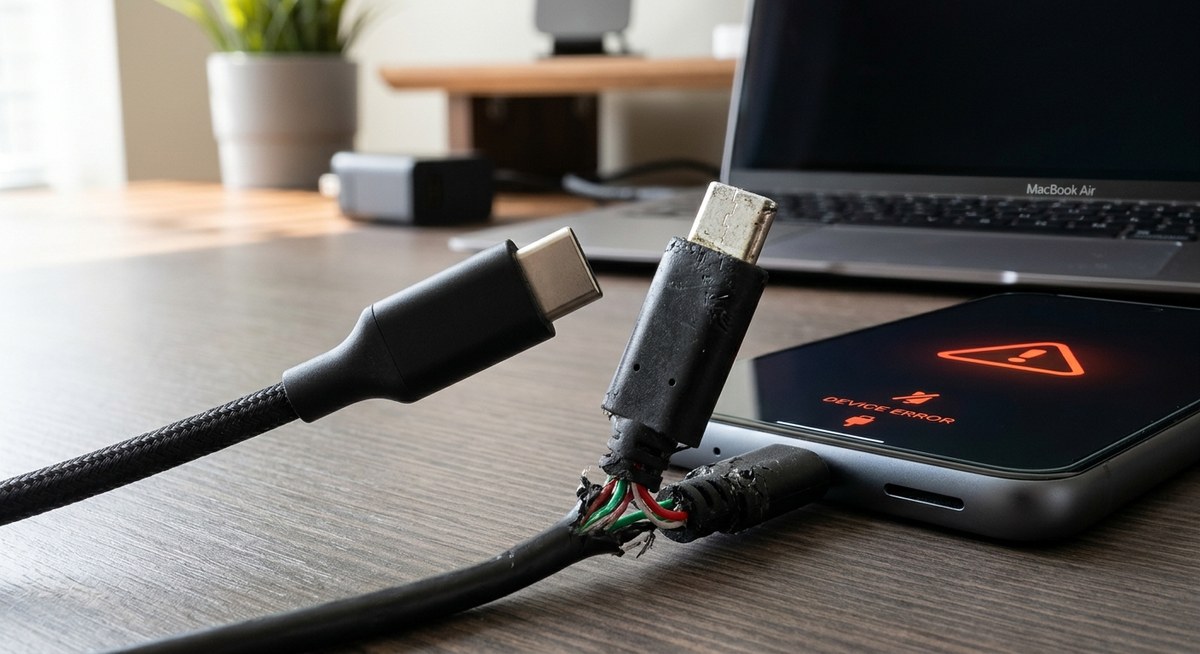
You just bought a new USB-C cable from a random online store or a street vendor. The price was too good to pass up. You plug it into your laptop, and nothing happens. Or worse, a burning smell starts coming from the port. That is the reality of a fake USB-C cable. These knockoffs are everywhere in 2026, and they can do real damage to your expensive gadgets. A bad cable can fry your phone’s charging circuit, corrupt data during a transfer, or even cause a fire. The good news is that you can spot them before they cause harm. You just need to know what to look for.
A fake USB-C cable often looks convincing but fails on small details. Check the connector pins, the cable thickness, the weight, and the packaging for typos. Use a USB tester to verify charging speed and data sync. Always buy from trusted brands or verified sellers. A few extra dollars upfront can save your phone or laptop from irreversible damage.
What Makes a USB-C Cable Fake?
USB-C is a complex standard. A real cable has to handle power delivery up to 240 watts, high speed data transfer, and video output. Counterfeit cables skip the safety electronics. They use thinner wires, cheap connectors, and no authentication chip. This means they can push too much power, overheat, or fail to negotiate the correct voltage with your device.
A genuine cable has a small chip inside that talks to your phone or laptop. This chip tells the device how much power is safe to draw. A fake cable either has a dummy chip or none at all. Without that communication, your device might try to pull 100 watts from a cable that can only handle 15. That is how ports get melted.
The 5 Step Visual Inspection
You can catch most fake USB-C cables with your eyes and hands. Do this before you even plug it in.
-
Check the connector pins. Look inside the USB-C plug. You should see a solid, seamless tongue with no gaps. Fake cables often have a visible seam down the middle or uneven pin spacing. The pins themselves should be gold colored and perfectly aligned. If you see plastic flashing or crooked pins, stop right there.
-
Feel the weight. A real USB-C cable that supports high wattage (60W or 100W) feels heavy. It has thick copper wires inside and a solid connector housing. A fake cable feels light and flimsy. Pick it up and compare it to a cable you know is real, like the one that came with your phone. If it feels like a toy, it probably is.
-
Bend the cable near the connector. The strain relief (the thick rubber part where the cable meets the plug) should be flexible but firm. Fakes often have hard, brittle plastic that cracks or separates from the connector. A good cable bends smoothly. A bad one kinks or shows the inner wires immediately.
-
Look at the logo and text. Real cables have clear, laser etched or embossed logos and specs. Look for the USB-IF certification logo (a trident shape). Check for text like “60W” or “5A” or “USB 3.2 Gen 2.” Fake cables often have blurry print, misspellings, or no text at all. If the printing rubs off with your fingernail, it is fake.
-
Inspect the packaging. Counterfeit cables often come in generic plastic bags or boxes with no branding. If there is a brand name, search for it online right there. Does the company exist? Do they have a real website? Many fakes use names that sound like real brands but are just random letters.
The Physical Test: What to Do Before You Trust It
If the visual check passes, move on to these tests. They take five minutes and can save you a lot of trouble.
- The magnet test. Take a small magnet and touch it to the connector head. Real USB-C connectors are made of non-magnetic stainless steel or brass. A fake might use cheap steel that attracts the magnet. If the connector sticks to a magnet, do not use it for charging.
- The wiggle test. Plug the cable into your phone or laptop. A real cable fits snugly with no play. A fake cable will wobble side to side inside the port. That wobble can damage the port over time. If it feels loose, throw it away.
- The temperature test. Plug the cable in and charge your phone at full speed. Touch the connector after 10 minutes. A real cable stays cool or warm. A fake cable gets hot. If it feels uncomfortably hot, unplug it immediately. That heat is a sign of electrical resistance and a fire risk.
Features That Belong on a Real USB-C Cable
Not every cable needs to be certified, but certain features are non-negotiable for safety. Here is a breakdown of what to expect from a genuine cable versus a counterfeit.
| Feature | Genuine Cable | Fake Cable |
|---|---|---|
| Connector | Solid, one piece metal housing | Two piece plastic with visible seam |
| Pins | Gold plated, even spacing | Dull metal, uneven or missing pins |
| Strain relief | Flexible rubber boot | Hard, brittle plastic |
| Weight (1m cable) | 25 to 40 grams | Under 15 grams |
| E-marker chip | Present, negotiates power | Missing or dummy chip |
| USB-IF logo | Clear, laser etched | Blurry, missing, or misspelled |
| Heat under load | Warm at most | Hot to the touch |
| Data speed | Matches advertised spec (USB 2.0, 3.2, etc.) | Slow or fails entirely |
“A fake USB-C cable is not just a waste of money. It is a liability. I have seen laptops with fried charging ports and phones that stopped charging entirely because of a $3 cable. Always buy from a reputable brand and verify with a USB tester.”
Marcus Chen, hardware engineer and USB-IF certified tester
How to Verify a Cable If You Already Own It
Maybe you already have a cable you are unsure about. You can test it without risking your main device.
-
Use a USB power meter. These small devices sit between your charger and your phone. They show you the voltage and current flowing through the cable. A real cable will match the expected numbers. A fake cable will show inconsistent voltage or fail to deliver the promised wattage. You can find a basic USB tester for under $20 online.
-
Try a data transfer test. Connect your phone to a computer and copy a large file, like a 1GB video. A real USB 3.2 Gen 2 cable should transfer at around 1GB per second. A fake cable will crawl at USB 2.0 speeds (around 30MB per second) or drop the connection entirely. If it takes forever, the cable is likely fake.
-
Check the e-marker chip. Some USB testers can read the e-marker chip data. The chip will report the cable’s maximum current, voltage, and data speed. If the tester says “no e-marker” or reports weird numbers (like “240W” on a thin cable), you have a counterfeit. This is the most definitive test.
Where Fake Cables Hide
Fake USB-C cables are not just on shady street corners. They show up in places you might trust.
- Online marketplaces. Amazon, eBay, and Walmart Marketplace are full of third party sellers pushing cheap cables. Look for “ships from and sold by” the retailer itself. Check the seller’s history and reviews. If the price is 80% less than the official brand, it is probably fake.
- Gas stations and convenience stores. The cables hanging on a rack near the register are almost always counterfeit. They are made to look like the real thing but cost pennies to produce. Avoid them.
- Dollar stores. A dollar store USB-C cable is never a good idea. The materials are too cheap to meet safety standards. You are better off using the cable that came with your device.
- Freebies at trade shows or events. A free cable handed out in a swag bag might be fine, but it could also be a low quality knockoff. Test it before you rely on it for charging your laptop.
The Simple Rule: Price Tells a Story
If a 100W USB-C cable costs less than $8, it is almost certainly fake. Real components cost money. The copper wire, the e-marker chip, the certified connector, and the testing all add up. A legit cable from a brand like Anker, Belkin, or Apple will cost between $10 and $30 depending on length and specs. That price is not a markup. It is the cost of safety.
Think about it this way. Your phone costs $800. Your laptop costs $1,200. Saving $5 on a cable is not worth the risk of destroying either device. If you want to save money, buy a certified cable from a brand you trust during a sale. Do not buy a no name cable from a random seller.
What to Do If You Bought a Fake Cable
Maybe you already have a drawer full of suspect cables. Here is what to do.
- Stop using it immediately. Do not throw it in a drawer for “emergencies.” That is how accidents happen. Dispose of it properly. Many electronics stores have recycling bins for cables.
- Check your device ports. If you used the fake cable, inspect your phone or laptop port with a flashlight. Look for melted plastic, bent pins, or discoloration. If you see damage, stop charging that device and take it to a repair shop.
- Report the seller. Go back to the marketplace where you bought it and report the listing as counterfeit. This helps protect other buyers. If you paid with a credit card, you can also dispute the charge.
- Learn from it. Next time, stick to the trusted brands. Your devices will thank you.
Trust Your Instincts and Your Eyes
You do not need to be an electrical engineer to spot a fake USB-C cable. Your gut feeling matters. If the cable feels too light, looks cheap, or the packaging has typos, trust that feeling. A real cable feels solid in your hand. The connector clicks in with a satisfying snap. The printing is crisp. The price is reasonable.
Spend the extra few dollars on a cable from a brand that has a reputation to protect. Your phone, your laptop, and your safety are worth it. Next time you are about to buy a cheap cable, remember the checklist. Look at the pins. Feel the weight. Check the price. A few seconds of inspection can save you from a very bad day.



Post Comment