Why Your Next Favorite App Might Be Built for Foldable Screens
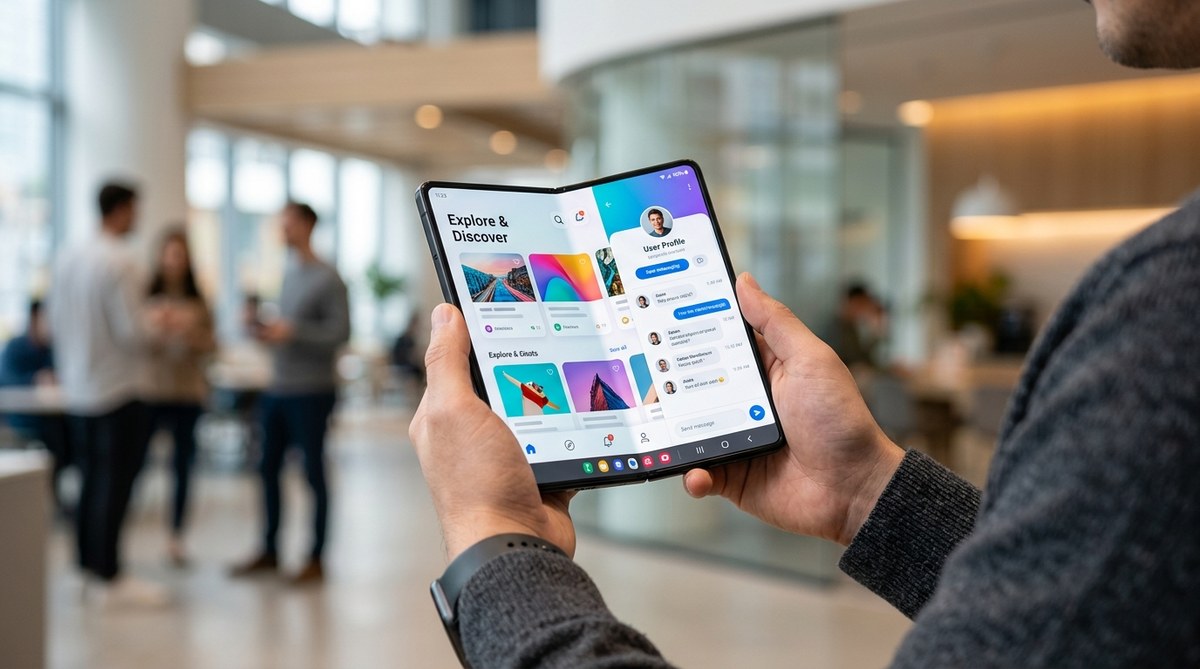
The Galaxy Z Fold 7 and the Pixel Fold 2 are here. Samsung and Google have proven foldables are not a passing fad. But the real story is not the hardware. It is the software running on those bendable screens. In 2026, the most exciting apps are designed for foldables from day one. They adapt to your screen in real time. They let you do two things at once without squinting. And they hint at a future where your phone transforms into a tablet, a laptop, or even a desktop, depending on what you need. If you are curious about what comes next, the foldable screen app future is already unfolding.
Foldable phones are no longer experimental gadgets. By 2026, app developers design with flexible screens in mind, creating experiences that adapt as you unfold your device. Your next favorite app could run like a phone, tablet, or desktop depending on how you hold it. From seamless multitasking to immersive gaming, the foldable screen app future is about software that bends to your needs. Understanding this trend helps you spot the next wave of essential apps.
Why Foldable Screens Are Changing the Rules
A regular phone screen is a rectangle. You work with what you get. A foldable screen, though, changes shape. It can be narrow and tall when closed. Or wide and square when open. This flexibility creates a new challenge for developers. An app designed for a standard slab phone will look stretched or awkward on a larger foldable display.
The best apps in 2026 do not just scale up. They adapt their layout, their controls, and their content based on the screen size and the device posture. This is the core of the foldable screen app future. Apps that get this right feel natural whether you are using the cover screen or the main display.
For example, a photo editing app like Lightroom shows your editing tools on a sidebar when unfolded, rather than hiding them behind menus. A note taking app like Samsung Notes gives you a full toolbar on one side and your canvas on the other. These small changes make a massive difference in daily use.
If you are still on the fence about whether foldables are ready, check out our take on why foldable phones are finally worth buying after years of false starts. The software ecosystem is the main reason.
What Makes an App Truly Foldable Friendly
Not every app that runs on a foldable phone is built for it. Many popular apps still stretch their content to fill the extra space, leaving you with oversized text and empty margins. A genuinely foldable friendly app does more than that.
Here are the features that separate great foldable apps from the rest:
- Adaptive layouts: The interface rearranges itself when you fold or unfold the device. Buttons move, panels appear, and content reflows without breaking.
- Multi window support: You can run two or three app instances side by side, each in its own pane, without weird scaling or cutoff text.
- Continuity: You start a task on the cover screen and continue on the main screen without losing your place. No reloading, no resetting.
- Hinge aware features: The app responds to the angle of the hinge. For example, a camera app can show the viewfinder on one half and controls on the other, turning your phone into a camcorder.
- Drag and drop: Moving files, images, or links between app panes works smoothly, like on a desktop.
Apps that tick all these boxes are rare in 2026, but they are growing fast. Developers now have tools like Google’s Jetpack WindowManager and Apple’s adaptive layout APIs to build these features without reinventing the wheel.
Three Steps to Building a Foldable App
If you are a developer or just curious about how these apps come to life, here is a simplified process. The same logic applies whether you use Android, iOS, or a cross platform framework.
-
Design for the largest screen first, then shrink down. Start with the unfolded layout. This is where you have the most space. Place navigation, controls, and content in logical zones. Then test how the layout compresses for the cover screen. Most mistakes happen when developers design for the small screen first and try to stretch it later.
-
Use state aware containers. Your app needs to know whether the device is folded, unfolded, or in a tent mode posture. Tools like Android’s WindowManager let you detect the hinge angle and the screen size in real time. Your UI components should listen to these changes and reposition themselves.
-
Test on real hardware, not just emulators. Emulators are useful for early testing, but they miss the physical feel of the hinge. The way a finger rests near the crease, the way the device balances in one hand, these details affect how people interact with your app. Borrow a device or use a cloud testing service that offers physical foldables.
“The biggest mistake I see is treating a foldable like a small tablet. A foldable is a shape shifter. Your app has to be one too.”
– Rachel Kim, Senior Product Designer at a major app studio
This advice holds true whether you are building a game, a productivity tool, or a social media client.
Common Mistakes and How to Fix Them
Even experienced teams slip up when adapting apps for foldable screens. Here is a table of the most frequent issues and the solutions that work.
| Mistake | Why It Hurts | How to Fix It |
|---|---|---|
| Stretching content instead of adapting it | Text and images look distorted or oversized on the large display | Use responsive layouts that rearrange elements, not just scale them |
| Ignoring the cover screen | Users open the phone and see a cramped, broken interface | Design a separate layout for the cover screen with its own navigation |
| Not handling the hinge area | Interactive elements get placed right on the crease, causing accidental taps | Keep buttons and key controls away from the hinge zone |
| Failing to save state during transitions | Users lose their place when folding or unfolding the device | Save scroll position, input text, and active selections before layout changes |
| Treating multitasking as optional | Users expect to run two apps side by side, but your app does not support it | Enable multi window mode and test with common companion apps |
Fixing these issues is not just about polish. It directly impacts user retention. A frustrating foldable experience leads to uninstalls.
Real World Examples That Get It Right
A handful of apps stand out in 2026 for their foldable design. They show what is possible when developers prioritize adaptability.
Google Keep is a great example. On a folded phone, it looks like a standard note list. When you unfold, the app switches to a two column view with notes on the left and the selected note on the right. No page reloads. No awkward zooming. It just works.
Microsoft Office apps like Word and Excel use a ribbon toolbar that expands on the large screen and collapses into a compact bar on the cover screen. The document itself reflows to match the width, so you never have to scroll sideways.
In the gaming space, Genshin Impact and Call of Duty Mobile now offer adjustable HUD layouts that let you move buttons away from the hinge. The larger screen also gives you a wider field of view, which is a real advantage in competitive play.
For more on how apps are evolving, read about top 5 emerging apps transforming mobile gaming in 2026.
What Developers Get Wrong
Building for foldables is not just about scaling a UI. The deeper challenge is rethinking how people hold and use the device. A foldable in your hand is not the same as a tablet on a desk. Users grip the edges differently. They may use one hand or two. They might hold the device at an angle while watching a video.
Apps that ignore these ergonomic details feel off, even if the layout looks correct. For instance, putting navigation at the top of a large unfolded screen forces users to stretch their thumbs. Better solutions include bottom navigation bars, floating action buttons near the thumb zone, and gesture based controls.
Another overlooked area is battery optimization. A larger screen draws more power. Apps that constantly animate or refresh content in the background drain the battery faster. Smart developers throttle background activity when the device is unfolded and prioritize efficiency.
Your Next Favorite App Will Adapt to You
The foldable screen app future is not about gimmicks. It is about freedom. Freedom to use your phone in the way that suits the moment. Fold it for one handed texting. Unfold it for reading an article or editing a spreadsheet. Prop it up in tent mode for a video call. The best apps in 2026 are the ones that disappear into the background and let you focus on what matters.
Look for apps that update their layout when you fold or unfold. Try dragging content between panes. Pay attention to how the app handles the transition. If it feels seamless, that app was built with foldables in mind. If it stutters or resets, it was not.
The shift is happening faster than most people realize. By the end of 2026, a majority of new app releases on Android will include foldable support. iOS will follow soon after. If you want to be ahead of the curve, start paying attention to how your apps behave on a foldable screen. That awareness will guide your next purchase and your daily workflow.
And if you are still wondering whether the technology is mature enough, take a look at our breakdown of is foldable technology finally ready for mainstream adoption. Spoiler: it is ready, and the apps are catching up fast.



Post Comment