Why Your Next Earbuds Case Should Be a Charging Hub for All Your Devices
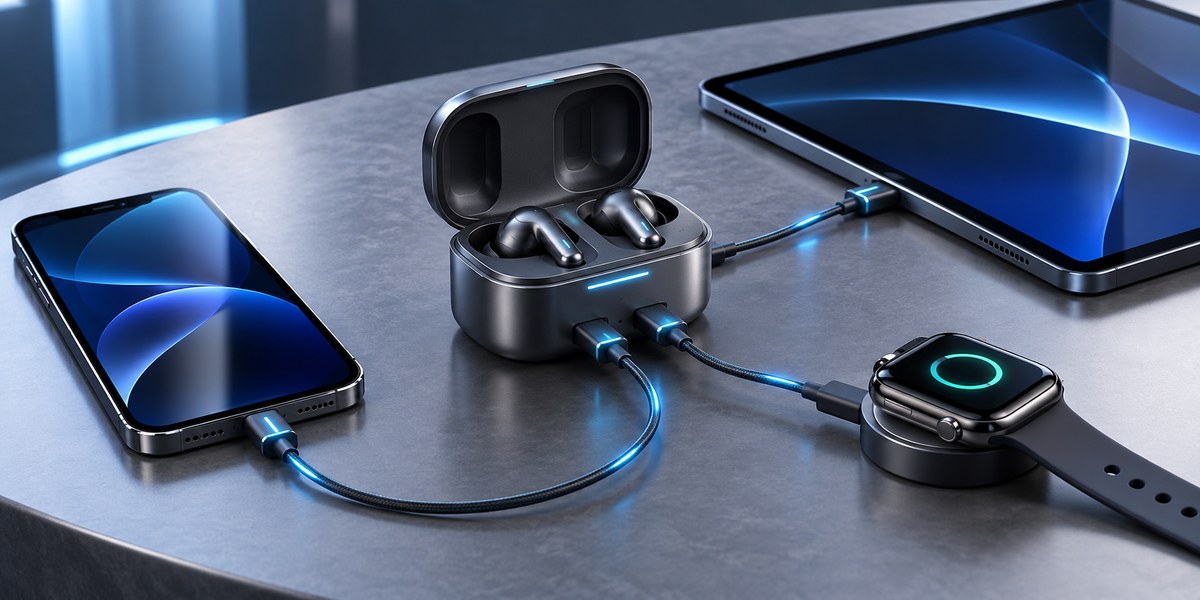
You are packing for a weekend trip. You grab your phone charger, your laptop power brick, the cable for your smartwatch, and the tiny case for your wireless earbuds. That is four separate items just to keep your gadgets alive. Now imagine zipping one compact case into your bag and knowing it can top up every device you own. That is the promise of the modern earbuds case charging hub.
A new wave of earbuds cases doubles as a universal charging station for your phone, smartwatch, laptop, and more. These hubs consolidate multiple cables into one portable unit, reducing clutter and simplifying travel. By investing in a single device that charges everything, you save space, cut down on e-waste, and keep your workflow uninterrupted. This guide explains how they work, what to look for, and why they are a smart upgrade for any multi-device user.
The Problem with Too Many Chargers
If you carry a smartphone, a pair of true wireless earbuds, a smartwatch, and a laptop, you are likely juggling at least three different charging cables. USB-C has helped unify some of that mess, but not all devices play nice together. Your smartwatch probably uses a proprietary magnetic puck. Your laptop might need a high-wattage brick that your phone cannot accept. And your earbuds case? It usually charges only the buds themselves.
This fragmentation creates real friction. You forget one cable at home. You realize your power bank does not have the right output for your tablet. You end up buying duplicate chargers for the office, the gym, and your nightstand. The result is more plastic, more copper, and more frustration.
How an Earbuds Case Becomes a Charging Hub
Manufacturers have started to realize that the earbuds case is the perfect Trojan horse for a universal charger. It is already something you carry daily. It already has a battery inside. Why not give that battery a few extra ports and let it charge your phone or watch too?
Here is how the concept works in practice:
- Integrated wireless charging pad – The top of the case doubles as a Qi charger for your phone or your earbuds. Just set your phone on the lid.
- Built-in USB-C port – A high-wattage port on the side can charge a laptop, tablet, or Nintendo Switch at speeds up to 65W or even 100W.
- Dedicated smartwatch cradle – Some cases include a small slot or magnetic dock for charging an Apple Watch or a Galaxy Watch.
- Pass-through charging – The case itself can be recharged via USB-C while simultaneously outputting power to another device.
This turns a single accessory into a central power station. You charge the case at night, and during the day it keeps everything else alive.
What to Look for in a Charging Hub Case
Not all multi-function earbuds cases are created equal. Some are gimmicks with weak batteries and slow output. Others are genuinely useful. Use this table to compare the key specs before you buy.
| Feature | Why It Matters | What to Avoid |
|---|---|---|
| Battery capacity (mAh) | Determines how many full device charges you get away from a wall outlet. | Anything below 3,000 mAh will barely charge a phone once. |
| Output wattage | Higher wattage (65W+) can charge laptops and tablets at full speed. | Under 18W means slow charging for anything larger than a phone. |
| Wireless Qi support | Lets you charge your phone without plugging in a cable. | Proprietary charging standards that do not work with your phone. |
| Smartwatch compatibility | A dedicated slot keeps your watch topped up without a separate puck. | Vague “compatible with most watches” that actually only works with one brand. |
| Pass-through charging | Allows the case to charge itself and your devices at the same time. | Cases that shut off all output while they recharge. |
| Size and weight | Must be pocketable or bag-friendly, not a brick. | Cases that are thicker than two stacked phones. |
Setting Up Your New Charging Hub
Getting started with an earbuds case charging hub is straightforward. Follow these steps to maximize its usefulness:
- Fully charge the case – Before you use it as a hub, let the case itself reach 100%. This gives you the full battery capacity to share.
- Pair your earbuds – Set up the buds as you normally would. The charging hub function is separate from the audio pairing.
- Test each output – Plug your phone into the USB-C port. Set your watch in the cradle. Place your phone on the wireless pad. Make sure every port works before you rely on it during travel.
- Enable pass-through mode – If your case supports it, plug the case into a wall charger. Then connect your laptop to the case. The case will charge itself while feeding power to your laptop. This is ideal for a desk setup.
- Monitor battery levels – Most hub cases have LED indicators or a companion app that shows remaining charge. Keep an eye on this so you never run out unexpectedly.
Real-World Scenarios Where This Shines
Imagine you are working from a coffee shop. Your laptop is at 15%, your phone is at 40%, and your smartwatch is buzzing with notifications. Instead of hunting for three outlets, you pull out your earbuds case. You plug your laptop into the side port. You set your phone on the wireless pad. Your watch snaps into the cradle. One device handles all three.
Or picture a long flight. You have a 6-hour journey ahead. Your earbuds case sits in the seatback pocket, quietly charging your phone while you watch movies on your tablet. When you land, everything is at 100%.
For travelers, this is a game changer. You no longer need a separate power bank, a laptop charger, a watch charger, and an earbuds case. You carry one gadget that does it all.
Expert advice: Look for a case that supports Power Delivery (PD) 3.0 and PPS (Programmable Power Supply). These standards allow the case to negotiate the optimal voltage for each connected device, which protects battery health and reduces heat. Cheap chargers that lack these protocols can slowly degrade your phone or laptop battery over time. If you want to keep your devices healthy for years, invest in a hub that talks the right language. For more on battery care, check out our guide on why your smartphone battery degrades faster than it should.
Common Mistakes to Avoid
Even a great charging hub can cause headaches if you use it wrong. Here are the most common pitfalls and how to sidestep them.
- Mixing incompatible cables – Using a low-quality USB-C cable that cannot handle 65W will throttle your laptop charging or even damage the port. Stick with certified cables rated for the wattage you need.
- Overloading the battery – Do not try to charge a laptop, a phone, and a tablet simultaneously from a 5,000 mAh case. The battery will drain in under an hour. Prioritize your most critical device.
- Ignoring heat buildup – Wireless charging generates heat. If you stack your phone on the case while also charging a laptop, the case can get uncomfortably warm. Give it breathing room.
- Forgetting to update firmware – Some smart hub cases receive firmware updates that improve charging profiles or fix bugs. Check the manufacturer’s app every few months.
- Assuming all Qi pads are equal – A cheap wireless pad may only deliver 5W, which is painfully slow. Look for cases that advertise 10W or 15W Qi charging for your phone.
The Best Use Cases for Different Users
Not everyone needs the same features. Here is a breakdown of who benefits most from each capability.
- For the frequent traveler – Prioritize battery capacity (at least 7,000 mAh) and laptop-level output (65W+). You need to survive a day without wall outlets.
- For the office commuter – Focus on pass-through charging and compact size. You want something that lives in your bag and tops up your phone and earbuds during the train ride.
- For the fitness enthusiast – Look for a case with a dedicated smartwatch cradle and sweat-resistant build. You will charge your watch and buds after every workout.
- For the minimalist – Pick a case that replaces your power bank entirely. It should have enough capacity to charge your phone twice and your earbuds three times before needing a recharge itself.
What the Future Holds for Multi-Device Charging
The earbuds case charging hub is just the beginning. By 2027, we will likely see cases that integrate GaN (gallium nitride) technology for smaller, cooler chargers. Some prototypes already include retractable cables and built-in AC prongs, so you can plug the case directly into a wall outlet without a separate adapter.
We are also seeing early moves toward universal wireless charging standards that could eliminate the need for any cable at all. Imagine a case that charges your phone, watch, and buds simultaneously through a single magnetic contact. That future is closer than you think.
If you are curious about how other gadgets are evolving to reduce clutter, take a look at our breakdown of 5 emerging technologies that will change how we work by 2026. The trend is clear: every device is trying to do more with less.
Making the Switch
Switching to an earbuds case charging hub is not about buying a novelty. It is about simplifying your daily carry. It means fewer cables to lose, fewer outlets to hunt for, and fewer moments of panic when your phone dies at 3% and your power bank is at home.
Start by checking the ports you use most. If you are already all-in on USB-C for your phone, laptop, and tablet, you are a perfect candidate. If you still use a micro-USB device or an older proprietary charger, you may need an adapter or a different hub model.
The investment is small compared to the convenience. A good hub case costs between $80 and $150, roughly the same as a decent power bank. But it replaces not just the power bank but also your earbuds case and your smartwatch charger. That is three devices for the price of one.
A Final Word on Cable Freedom
The best tech disappears into your routine. You stop thinking about it. That is exactly what a good charging hub does. You grab your earbuds case in the morning, and you never worry about battery levels again. Your phone, your watch, your laptop, and your buds all stay topped up with zero extra effort.
If you are tired of untangling cables every time you sit down at a desk or unpack at a hotel, this is the upgrade worth making. Your next earbuds case should be more than a storage box. It should be the power station that keeps your entire digital life running.
And when you finally ditch the extra chargers, you will wonder why you waited so long.



Post Comment