What Is the Best Refresh Rate for Your Monitor in 2026?
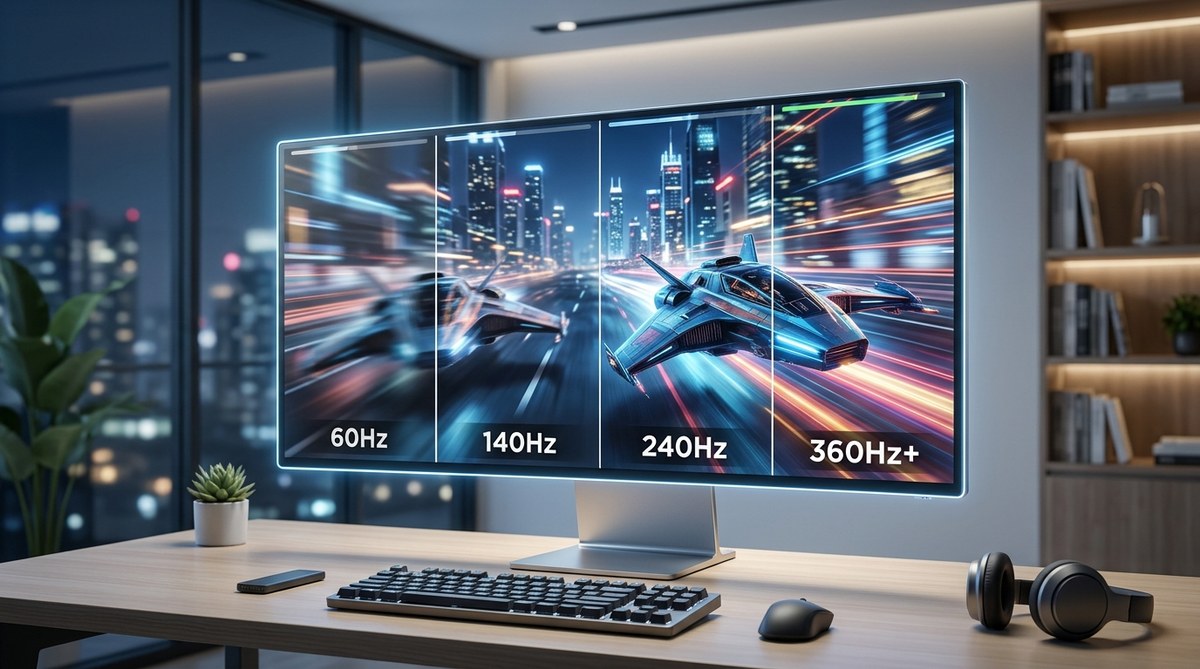
You sit down at your desk, open a game, and something feels off. The mouse movement is a little blurry. The camera pan is choppy. You know your PC is powerful enough, but the experience just doesn’t feel smooth. That’s your monitor’s refresh rate holding you back. If you are still using a standard 60Hz display, you are missing out on a much more fluid experience. The question is not whether you should upgrade. The question is how far you should go. In 2026, the monitor market offers everything from budget 144Hz panels to blistering 360Hz OLEDs. Picking the best refresh rate for your monitor is about matching the spec to what you actually do.
The best refresh rate for a monitor in 2026 depends entirely on your use case. For office work and casual browsing, 60Hz is still fine. For competitive gaming, 240Hz offers a clear edge. For most gamers who play a mix of titles, 144Hz to 165Hz is the sweet spot that balances smoothness, cost, and GPU demands. Do not buy a 360Hz monitor unless you play esports titles and own a top-tier graphics card.
Understanding Refresh Rate and Why It Matters
Refresh rate measures how many times your monitor updates the image each second. It is measured in Hertz (Hz). A 60Hz monitor refreshes 60 times per second. A 144Hz monitor refreshes 144 times per second. More refreshes mean smoother motion and less perceived blur.
This is not just about gaming. Scrolling through a long webpage on a 120Hz or 144Hz monitor feels noticeably smoother. The text stays readable as it moves. The cursor glides across the screen. Once you get used to a higher refresh rate, going back to 60Hz feels like wading through mud.
For gaming, the difference is even bigger. In a fast shooter like Call of Duty or Overwatch 2, a higher refresh rate lets you track moving targets more clearly. You see enemy movements frame by frame instead of as a blur. That split-second clarity can win a gunfight.
The Best Refresh Rate for Monitor 2026: Recommendations by Use Case
There is no single answer to the best refresh rate for a monitor. It depends on what you do. Here is a breakdown by activity.
General Productivity and Office Work
If you spend your day in spreadsheets, email, and web browsers, 60Hz is still perfectly fine. A 4K 60Hz monitor gives you sharp text and plenty of screen real estate. However, if you can afford the upgrade, a 120Hz or 144Hz monitor makes scrolling and window management much smoother. It is a quality-of-life improvement that reduces eye strain over a long workday.
Casual and Story-Driven Gaming
If you play single-player games like the latest God of War or Red Dead Redemption 2, you care more about visual fidelity than maximum frames per second. A 60Hz to 120Hz monitor is a great match. You can max out graphics settings at 4K and still enjoy a smooth experience. Many modern consoles also cap at 120Hz, making this a good target for console gamers.
Competitive and Esports Gaming
This is where high refresh rates shine. Games like Valorant, CS2, Apex Legends, and Fortnite benefit directly from higher frame rates. Here, 144Hz is the entry point. 240Hz is the standard for serious players. 360Hz and even 540Hz monitors exist, but they offer diminishing returns. Unless you are a professional player or have an unlimited budget, 240Hz is the practical ceiling.
Content Creation and Video Editing
Video editors often assume they need high refresh rates, but the priority is color accuracy and resolution. A 60Hz monitor that covers 100% of the sRGB or DCI-P3 color space is better for editing than a high-Hz gaming panel with poor color. That said, 120Hz helps with smooth timeline scrubbing. If you do both gaming and editing, a 144Hz IPS monitor with good color coverage is the best compromise.
How to Choose Your Refresh Rate: A Step-by-Step Process
Follow these steps to avoid wasting money on a refresh rate your system cannot drive.
-
Check your current frame rates. Run a game and monitor your FPS with software like MSI Afterburner or the in-game overlay. If your GPU cannot hit 144 FPS in your favorite games, a 144Hz monitor will not help. You will see the same 60 FPS you always did.
-
Match your monitor to your GPU. A 240Hz monitor needs a GPU that can push 240 frames. For 1440p 240Hz, you need at least an RTX 4070 or equivalent. For 4K 144Hz, you need an RTX 4080 or better.
-
Decide on resolution first. Refresh rate and resolution are linked. A 1080p 360Hz monitor is cheaper than a 4K 144Hz monitor. Choose your resolution based on your GPU power and desk size, then pick the highest refresh rate within your budget.
-
Consider adaptive sync. G-Sync (NVIDIA) and FreeSync (AMD) eliminate screen tearing. They are invaluable at high refresh rates. Make sure your monitor supports one of these technologies.
-
Test before you buy if possible. Many electronics stores have demo units. Move the mouse around. Open a browser. See if the smoothness feels worth the price to you.
Common Mistakes When Buying a High Refresh Rate Monitor
Even experienced buyers make these errors. Avoid them to get the best value.
| Mistake | Why It Hurts You | What to Do Instead |
|---|---|---|
| Buying 360Hz for story games | You pay a premium for frames you do not need. The GPU cannot hit 360 FPS in Cyberpunk 2077. | Buy a 144Hz or 165Hz monitor and save money. |
| Ignoring panel type | A 240Hz VA panel may have black smearing. Motion clarity suffers. | Choose IPS or OLED for the cleanest motion at high Hz. |
| Forgetting about input lag | Some budget 144Hz monitors have high input lag. The refresh rate is fast, but the response feels delayed. | Read reviews that measure input lag, not just refresh rate. |
| Not enabling the refresh rate | Many people plug in a 144Hz monitor and leave it at 60Hz in Windows settings. | Go to Display Settings and set the correct refresh rate. |
Expert advice: “A 144Hz monitor with a good response time will feel smoother than a 240Hz monitor with slow pixel transitions. Do not chase the number alone. Look for reviews that test motion clarity, not just refresh rate specs.”
What About 360Hz and 540Hz Monitors?
In 2026, 360Hz monitors are common, and 540Hz models are starting to appear. These are designed for a specific audience: competitive esports players who play at 1080p with low graphics settings. If you are a casual player, you will not notice the difference between 240Hz and 360Hz. The human eye has limits, and the improvement from 240Hz to 360Hz is much smaller than the jump from 60Hz to 144Hz.
Stick with 240Hz unless you have money to burn and play games where every millisecond counts.
Refresh Rate and GPU: The Balancing Act
You cannot just buy the best refresh rate monitor and call it done. Your graphics card must be able to output enough frames. Here is a simple table to guide your pairing.
| Monitor Resolution | Target Refresh Rate | Recommended GPU (2026) |
|---|---|---|
| 1080p 240Hz | 240 FPS | RTX 4060 / RX 7600 |
| 1440p 165Hz | 165 FPS | RTX 4070 / RX 7800 XT |
| 1440p 240Hz | 240 FPS | RTX 4080 / RX 7900 XT |
| 4K 144Hz | 144 FPS | RTX 4090 / RX 7900 XTX |
If your GPU is older, consider lowering the resolution or refresh rate target. A 60Hz 4K monitor with a high-end GPU still looks amazing for most games.
The Hidden Cost of Cheap High-Refresh Monitors
Not all high refresh rate monitors are created equal. A budget 240Hz monitor might use a slow VA panel that blurs dark scenes. It might have poor color accuracy or low brightness. Always check reviews before buying. Look for terms like “response time,” “overshoot,” and “input lag.” A monitor that hits 240Hz but has 10ms of input lag will feel worse than a quality 144Hz monitor with 3ms of input lag.
What Is the Best Refresh Rate for Your Monitor in 2026?
The honest answer is 144Hz for most people. It offers a massive improvement over 60Hz. It is affordable. It works well with mid-range GPUs. It is smooth for both gaming and daily use. If you are a competitive gamer, step up to 240Hz. If you only do office work, 60Hz is still fine, but 120Hz is a nice luxury.
Here is a quick checklist to help you decide.
- You play mostly single-player games: 60Hz to 120Hz is enough.
- You play a mix of games: 144Hz is the sweet spot.
- You play esports titles seriously: 240Hz is worth it.
- You edit video or photos: prioritize color accuracy over refresh rate.
- Your budget is tight: a quality 1080p 144Hz monitor costs under $200 in 2026.
Making the Switch: What to Expect
When you move from 60Hz to 144Hz, the difference is immediate. Moving your mouse feels like it is coated in butter. Scrolling web pages is effortless. In games, the world becomes clearer. You will wonder how you tolerated 60Hz for so long.
One thing to watch out for: you may need to adjust your in-game settings. Higher refresh rates demand more from your CPU and GPU. You might need to lower some graphics settings to maintain a stable frame rate. That is a fair trade for the smoothness you gain.
If you want to learn more about optimizing your system, check out our guide on how to optimize your gaming PC for maximum FPS in 2026. It covers the exact settings that free up performance without sacrificing visual quality.
Your Next Monitor Should Match Your Life, Not Just the Spec Sheet
The best refresh rate for your monitor in 2026 is the one that fits your actual usage. Do not get caught up in the numbers game. A 360Hz monitor is wasted on someone who plays strategy games. A 60Hz monitor is perfectly fine for someone who only watches YouTube and edits documents.
Think about what you do most. If gaming is your main hobby, 144Hz is the baseline. If you compete, go for 240Hz. If you work, prioritize resolution and color. And always, always make sure your GPU can keep up. A monitor is an investment that lasts years. Choose wisely, and you will enjoy a smoother, more responsive experience every single day.


Post Comment