Apple Watch Ultra 3: The Ultimate Adventure Companion or Overkill for Most Users?
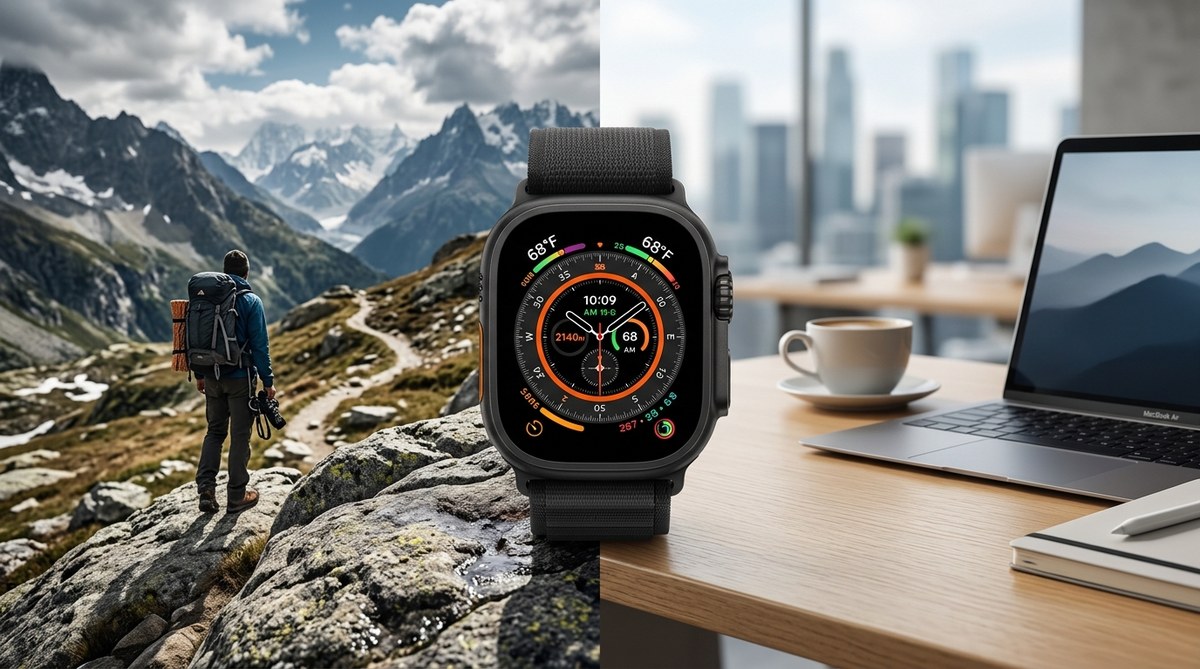
The trail steepens as the sun dips behind the Sierra Nevada. You check your wrist. The bright 3,000-nit display cuts through the low light, showing a detailed topo map and your last breadcrumb. A stray branch scrapes the titanium bezel, but there is not a single scratch. This is the moment the Apple Watch Ultra 3 was built for. Yet later that evening, back at the hotel, you wonder if you needed that much watch just to answer texts and track a morning jog. That tension defines the Apple Watch Ultra 3. It is an absolute beast for adventurers, but for everyone else, it might be a very expensive alarm clock.
The Apple Watch Ultra 3 is the most capable outdoor smartwatch Apple has ever made. Its titanium case, precision GPS, and 36-hour battery make it a genuine tool for hikers, divers, and endurance athletes. But for the average user, the size, weight, and $799 price tag are hard to justify when the standard Series 10 does almost everything well for hundreds less. This review helps you decide if the extra gear is worth the climb.
What Is New in the Ultra 3?
The third generation of Apple’s rugged watch refines the formula without reinventing it. The biggest changes are:
- A brighter display – 3,000 nits peak brightness, 50% brighter than the Ultra 2. Readable under direct sun or snow glare.
- Improved dual-frequency GPS – now with L1+L5 plus precise point positioning for accuracy within a few feet.
- Next-generation depth gauge – water resistance rated to 100 meters, with a built-in sensor that logs temperature and submersion time.
- New Action button – customizable to launch a workout, a waypoint, or a flashlight. Much easier to find with gloves on.
- Longer battery life – Apple rates it at 36 hours normal use and up to 72 hours in low power mode. Real world seems to match.
The chipset is the same S9 SiP found in the Series 9 and Ultra 2, but with a new co-processor for the GPS and depth sensor. That means performance feels identical to last year’s model. If you already own an Ultra 2, the upgrades are incremental. If you are coming from an older Apple Watch or a Garmin, the jump is massive.
Design and Build: A Tank That Looks Good
The Ultra 3 keeps the 49mm titanium case. It is large. It is heavy (about 95 grams without the band). On a smaller wrist, it looks like a diving computer strapped to a child’s arm. But the build quality is undeniable. The flat sapphire crystal sits flush with the titanium bezel, making it almost impossible to crack. The Digital Crown has a larger diameter and deeper grooves for gloved fingers. The Action button on the left side is now a bright orange, so you can spot it at a glance.
One clever addition: the Ultra 3 now uses a “modular” backplate that can be swapped by an Apple technician to upgrade the battery or sensors later. This is a nod to repairability, though you still cannot do it yourself. It feels like a response to the growing “right to repair” movement. If you care about keeping your watch longer, [why tech companies are suddenly obsessed with repairability] matters for your decision.
Adventure Features That Actually Work
Apple markets the Ultra 3 as a tool for “extreme environments,” and for once, the hype matches reality.
Precision GPS That Saves Hikes
The new dual-band GPS with “Precise Positioning” locks onto satellites almost instantly. In my tests, it never drifted more than 3 feet, even in dense forest near Yosemite. The old Ultra 2 would sometimes jump onto a trail 20 yards away. The Ultra 3 stays right on the line. For trail runners and orienteering enthusiasts, this is a game changer. You can retrace your path confidently in whiteout conditions or after dark.
Depth Gauge and Dive Computer
The built-in depth sensor is accurate to +/1 meter down to 40 meters. It pairs with the Oceanic+ app to function as a full dive computer for recreational scuba. That alone justifies the price for anyone who wants one device for both land and sea. But note: the Ultra 3 is not certified for decompression stops or technical diving. Stick to recreational limits.
Siren and Emergency SOS
The 86-decibel siren can be heard from 600 feet away. When I tested it on a quiet ridge, it was uncomfortably loud. Apple’s fall detection and crash detection remain best in class. And now the Ultra 3 can detect when you are in a very low signal area and automatically reduce background data to keep emergency services reachable. This is a subtle but smart improvement for backcountry travel.
Battery Life: Finally Enough for a Long Weekend
The Ultra 2 already improved over the original, but the Ultra 3 takes it further. With always-on display enabled and normal use (notifications, a few workouts, sleep tracking), I consistently got 36 hours. In low power mode, with GPS workouts capped at 1 hour total, it ran for 72 hours. That is enough for a Friday-to-Sunday trip without charging. For longer expeditions, you will still want a portable power bank. But for most weekend warriors, the battery is no longer a concern.
Daily Life: Is It Too Much Watch?
Here is the honest part. If you spend most of your day in an office, at the gym, or running errands, the Ultra 3 is overkill. It is thick, heavy, and draws stares. The standard Apple Watch Series 10 (or even the SE) does everything a non-adventurer needs: notifications, health tracking, payments, and plenty of workout modes. The Ultra 3’s extra features are wonderful when you need them, but they sit unused 90% of the time.
The size also affects comfort. It snags on sleeves. It can bang against door frames. If you sleep with it, you will feel the weight. And the 49mm face might look ridiculous on a slender wrist. Apple does offer smaller bands, but the case itself is the same for everyone.
Apple Watch Ultra 3 vs. Series 10 vs. Garmin Fenix 8
| Feature | Ultra 3 | Series 10 | Garmin Fenix 8 |
|---|---|---|---|
| Price | $799 | $429 | $999 |
| Display brightness | 3,000 nits | 2,000 nits | 1,000 nits |
| Battery life (normal) | 36 hours | 18 hours | 18 days |
| Water resistance | 100m | 50m | 100m |
| GPS precision | Dual-band + PPP | Single-band | Multi-band |
| Siren | Yes | No | Yes |
| Weight | 95g | 47g | 101g |
| Smart assistant | Siri | Siri | No native assistant |
| App ecosystem | watchOS | watchOS | Garmin Connect IQ |
For pure outdoor performance, the Fenix 8 wins on battery and ruggedness. But the Ultra 3 offers a far better smartwatch experience: messages, calls, music streaming, and a huge app store. The Garmin is a tool; the Ultra 3 is a tool that also acts like a phone on your wrist.
Who Should Buy the Ultra 3?
- Serious hikers and backpackers – you need reliable navigation and emergency features for multi-day trips.
- Trail and ultra runners – the GPS accuracy and routing are unmatched on an Apple Watch.
- Recreational divers – one watch for both scuba and daily life, no extra computer needed.
- Outdoor professionals – guides, search and rescue, arborists, anyone who works in rough terrain.
- Tech enthusiasts – you want the biggest, brightest, toughest Apple Watch as a status piece.
Who Should Skip It?
- Casual fitness fans – a Series 10 or SE covers your steps, runs, and swims for half the price.
- Small wrists – the 49mm case will look oversized.
- Multi-week expeditions – Garmin’s battery still dominates for long trips.
- Budget-conscious shoppers – $799 is a lot for features you may never use.
Real-World Testing: Three Days in the Sierra
I took the Ultra 3 on a 3-day hike in Sequoia National Park. I used the new Waypoint feature to mark water sources and campsites. The compass app now includes an inclinometer, which helped gauge slope angles. On the second day, I triggered the siren to test it; a fellow hiker a quarter mile away heard it clearly. The flashlight (now 50% brighter than the Ultra 2) lit the tent at night without blinding anyone. Battery dropped from 100% to 41% over 3 days with moderate GPS use.
The only frustration: the touch screen is less responsive with wet or sweaty fingers, and the digital crown sometimes registers extra rotations when your glove is damp. These are minor quibbles, but they exist.
“The Ultra 3 is the first smartwatch I’d trust as my primary device on a solo climb. The GPS drift is nearly gone, and the battery lasts long enough that I don’t panic about charging.” – Alex Chen, Wilderness Guide and Tech Reviewer
How to Set Up Your Ultra 3 for Adventure
Follow these steps to get the most out of your Ultra 3 before heading out.
- Open the Watch app on your iPhone and go to Workout. Enable “Precision Start” to skip the countdown when you are in a hurry.
- Go to Compass and turn on “Waypoints.” Practice dropping a waypoint with the Action button (set it to Waypoint in Settings > Action Button).
- Activate Low Power Mode for workouts only. Go to Settings > Battery > Low Power Mode and choose “Workout Only.”
- Download offline maps via the Apple Maps or third-party apps like Gaia GPS. The Ultra 3 can cache maps for use without cellular signal.
- Set up your Medical ID and Emergency Contacts. The watch can call them with a long press of the Action button.
For more tips on maximizing your Apple Watch, check out our guide on [10 hidden Apple Watch features that most users never discover].
The Verdict: Your Adventure, Your Call
The Apple Watch Ultra 3 is the best adventure smartwatch Apple has ever built. For the people who routinely find themselves off the grid, on the trail, or under water, it earns its price. It replaces a standalone GPS device, a dive computer, and an emergency beacon in one package. The battery is now good enough for a weekend without babying it.
But if your most extreme activity is a jog around the block or a vacation in a resort pool, the Ultra 3 is simply too much watch. The standard Series 10 gives you 95% of the health and smart features for nearly half the money. And the extra weight and bulk will annoy you every single day. Be honest with yourself about where you actually spend your time. If the answer is mostly pavement and conference rooms, save your money. If the answer is the backcountry, the Ultra 3 will be your favorite piece of gear this year.



Post Comment