How to Spot a Fake USB-C Cable Before It Destroys Your Laptop
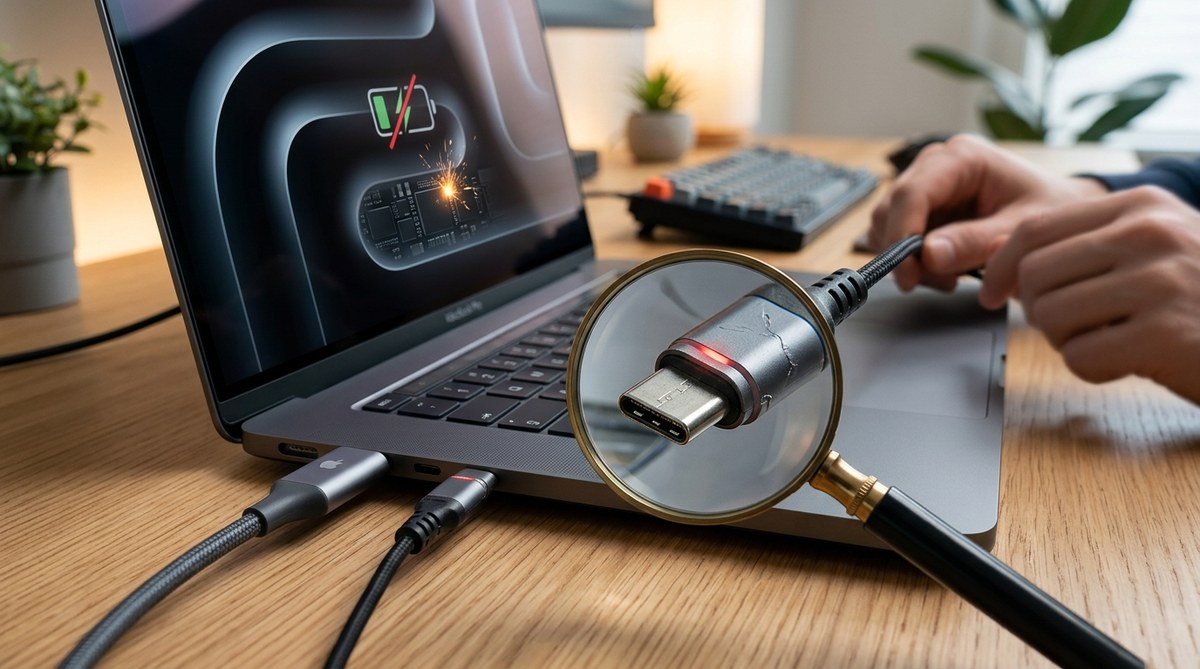
One wrong cable can turn a $2,000 laptop into a paperweight. That is not an exaggeration. USB-C is the universal port for modern devices, handling power, data, and video through a single connector. But that convenience comes with a hidden risk. Counterfeit cables flood online marketplaces, and they do not follow the safety standards that protect your hardware. A fake USB-C cable can deliver too much power, carry data-stealing malware, or even start a fire. The scary part? Many of these fakes look almost identical to the real thing. Before you plug that bargain cable into your MacBook Pro or Dell XPS, here is exactly what to look for.
Fake USB-C cables are dangerous because they lack the internal electronics that regulate power delivery and data transfer. They can fry your laptop’s charging port, corrupt files, or cause a battery fire. You can spot them by checking for an e-marker chip, inspecting the connector pins, and verifying USB-IF certification. Spending a few extra dollars on a trusted brand protects your devices and your safety.
Why counterfeit cables are so risky
USB-C is not just a simple plug. It is a sophisticated interface that negotiates power levels between a charger and a device. A genuine cable contains a small chip called an e-marker. This chip tells your laptop how much power the cable can safely handle. A 60-watt cable is different from a 100-watt cable, and a fake one will either lie about its rating or skip the chip entirely.
When you plug a counterfeit cable into your laptop, the device might try to pull 100 watts through a cable built for 15 watts. That mismatch generates heat. A lot of heat. The plastic around the connector can melt. The internal wires can short circuit. In worst cases, the lithium-ion battery in your laptop can enter thermal runaway, which is the technical term for a fire that is very hard to put out.
Beyond fire risks, fake cables often have poor shielding. That means electrical noise can bleed into the data lines. You might see flickering on an external monitor, random disconnects on an SSD, or corrupted files during a transfer. Some counterfeit cables even contain hidden hardware that can install malware on your computer. Security researchers have found cables with built-in Wi-Fi chips that let attackers access your machine remotely.
The three-step inspection process
You do not need a lab to spot a dangerous cable. You just need to know what to look for. Follow these three checks every time you buy a new USB-C cable.
-
Check for the e-marker chip. A compliant USB-C cable that supports power delivery above 60 watts must have an e-marker chip inside the connector. You can sometimes see a small rectangular outline on the metal housing. If you open the cable (do not do this on a cable you plan to use), the chip looks like a tiny circuit board. On many genuine cables, the manufacturer prints a logo or a serial number near the connector that indicates e-marker compliance. If a cable claims to support 100 watts but has no visible chip or markings, it is almost certainly fake.
-
Inspect the connector pins. Look inside the USB-C plug with a bright light. A genuine connector has five pins on both the top and bottom rows. Count them. Some fakes skip pins to save money, which means they cannot handle full data speeds or proper power negotiation. The pins should also be the same color and finish. If you see a mix of gold and silver pins, or if some pins are missing entirely, put that cable back.
-
Verify USB-IF certification. The USB Implementers Forum runs a compliance program for cables. Certified cables get a unique ID number and a logo. Many manufacturers list their certification on the product page or on the cable itself. You can search the USB-IF database online to confirm a cable is certified. If a brand does not mention certification, or if the listing uses vague terms like “compatible with USB-C,” treat it with suspicion.
What to scan for at a glance
When you are shopping online or standing in a store, use this checklist to evaluate a cable before you buy.
- Does the packaging or listing include a USB-IF logo?
- Is the cable rated for a specific wattage, like 60W or 100W?
- Does the brand have a real website with support information?
- Are customer reviews mentioning melted connectors or failed charging?
- Is the price suspiciously low compared to similar cables from known brands?
- Does the cable feel heavy and solid, or light and flimsy?
- Are the connector ends a single piece of metal, or do they have seams?
- Is the cable length listed? Genuine high-power cables rarely exceed 3 feet for 100W ratings.
If you answer “yes” to the last two questions about low price and flimsy feel, or “no” to the first two about certification and wattage, skip that cable.
Common mistakes and how to avoid them
Even experienced buyers get tripped up. Here is a table of common mistakes and the right way to approach each one.
| Mistake | Why it happens | What to do instead |
|---|---|---|
| Trusting a high rating on Amazon | Sellers can copy descriptions from real products | Check the brand’s official site for the same specs |
| Buying from third-party sellers on major retail sites | Fakes slip through marketplace checks | Buy directly from the manufacturer or an authorized reseller |
| Thinking a braided cable means quality | Braided sleeves hide cheap internals | Look for e-marker and certification, not just looks |
| Using a phone charger cable for a laptop | Phone cables are usually 15W to 60W | Use a cable rated for your laptop’s power needs |
| Assuming all USB-C cables are the same | USB-C is a shape, not a standard | Match the cable to the device’s power and data requirements |
Expert tip: If you travel frequently, carry a USB power meter. These small devices plug between your charger and cable and show the actual voltage and current flowing through. A cable that claims 100 watts but only delivers 20 watts under load is a counterfeit. I have seen power meters save three laptops in the last year alone.
How to buy safe cables without overpaying
You do not need to spend $40 on every cable. But you should avoid the $3 specials from unknown sellers. Here is a practical approach.
Stick with brands that have a history of USB-IF compliance. Anker, Belkin, Apple, Cable Matters, and Monoprice all sell certified cables at reasonable prices. A certified 100W USB-C cable from one of these brands costs between $10 and $20. That is a small price for protecting a $1,500 laptop.
When you buy, look for the cable’s power delivery profile. A good listing will say “Supports 100W (20V/5A) Power Delivery.” If the listing only says “fast charging” without numbers, move on. Also check the USB version. USB 3.2 Gen 2 cables support 10Gbps data transfer. USB 4 cables support 40Gbps. If a cable claims USB 4 speeds but costs $5, it is lying.
For laptop charging specifically, buy cables that are no longer than you need. Longer cables have more resistance and generate more heat at high power levels. A 3-foot cable is ideal for charging a laptop on a desk. A 6-foot cable is fine for lower-power devices like phones and tablets.
What to do if you already own a suspicious cable
If you have a cable that feels wrong, do not wait for it to fail. Unplug it immediately. Check the connector for any signs of heat damage, like discolored plastic or a melted tip. Plug it into a power meter if you have one. If the cable gets warm to the touch during normal charging, that is a red flag.
Replace it with a certified cable from a trusted brand. Do not throw the fake cable in the trash where someone might find it. Cut it into pieces or destroy the connectors so it cannot be reused.
If you have been using a counterfeit cable for a while, inspect your laptop’s USB-C port. Look for bent pins, burn marks, or loose fit. If the port feels damaged, stop using it and take the laptop to a repair shop. A damaged port can cause intermittent charging failures and data corruption. In some cases, it can even damage the motherboard.
The real cost of a fake cable
A single counterfeit USB-C cable can cost you far more than the price of a certified one. Consider the math. A certified cable costs around $15. A fake cable costs $5. You save $10 upfront. But if that fake cable damages your laptop’s charging port, the repair bill starts at $200 for a simple port replacement on most ultrabooks. If the cable causes a battery fire, you are looking at replacing the entire device, plus potential property damage.
That $10 saving turns into a $2,000 loss in the worst case. Even in the best case, a fake cable will charge slower, transfer data at a crawl, and fail within months. You will end up buying a replacement anyway. The certified cable is cheaper in the long run.
Protect your devices starting today
The USB-C cable market is full of traps, but you now have the tools to avoid them. Check for the e-marker chip. Inspect the pins. Verify USB-IF certification. Buy from brands you trust. Use a power meter if you want extra peace of mind. And most importantly, treat any cable that looks too good to be true with the suspicion it deserves.
Your laptop does not know the difference between a $5 cable and a $15 cable. It just knows whether the power and data it receives are within safe limits. A few minutes of inspection can save you from a fried motherboard, a corrupted hard drive, or a fire in your home office. Take those minutes. Your wallet and your safety will thank you.
For more on keeping your devices healthy, check out our guide on why your smartphone battery degrades faster than it should and our breakdown of the hidden costs of cheap USB-C cables that could damage your devices.


Post Comment