iPad Pro vs MacBook Air: Which One Actually Fits Your Workflow Better?
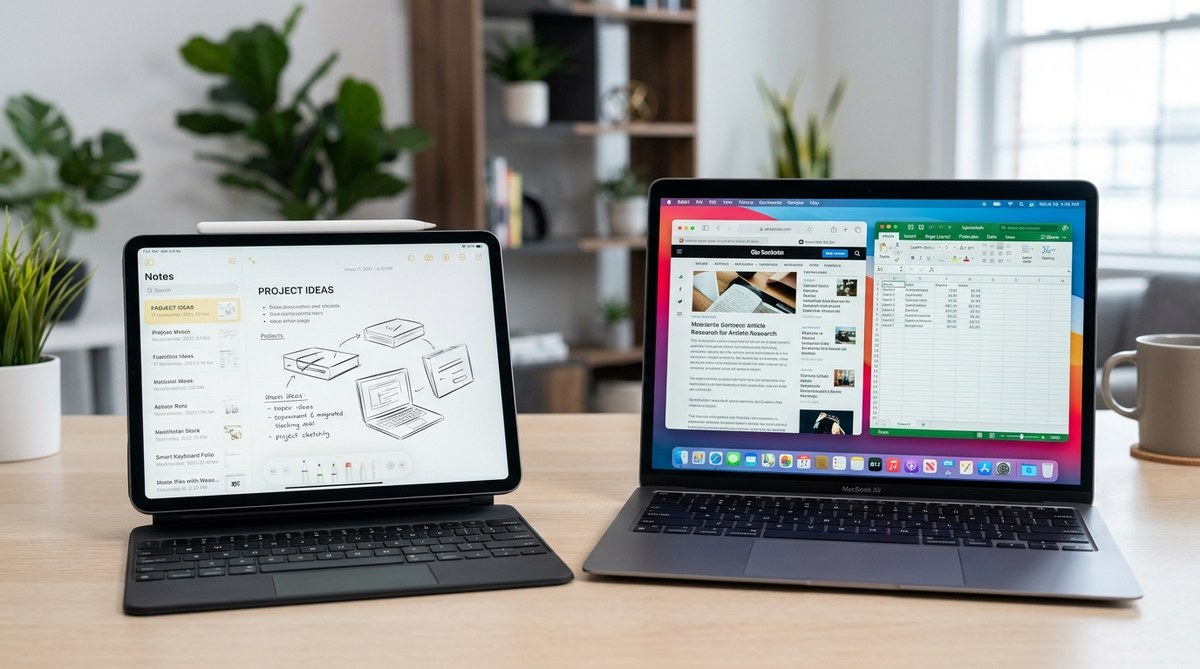
Getting the right device for your work, studies, or creative projects can be a game changer. The decision often comes down to choosing between an iPad Pro and a MacBook Air. Both are powerful, portable, and packed with features. But they serve different purposes and cater to distinct workflows. Knowing their strengths and limitations can help you make a smart choice that aligns with your daily needs.
Choosing between an iPad Pro and MacBook Air depends on how you work. The iPad Pro excels in touch, portability, and creative tasks, while the MacBook Air offers a traditional laptop experience with more power for productivity and multitasking. Consider your typical workflows and environment to pick the device best suited for your lifestyle.
Which device is better for your core activities?
Understanding your main activities is the first step. Are you mostly consuming content, creating art, or running intensive software? The answer guides which device makes more sense.
Content consumption and casual use
The iPad Pro shines when it comes to media. Its vibrant display and touch interface make browsing, reading, and streaming more engaging. You can easily switch between watching videos, sketching with the Apple Pencil, or using apps like Procreate. For casual browsing and light productivity, the iPad Pro offers unmatched flexibility.
Productivity and multitasking
If your workflow involves typing lengthy documents, managing spreadsheets, or running multiple apps simultaneously, the MacBook Air provides a more traditional experience. Its keyboard, trackpad, and macOS environment support complex workflows comfortably. While the iPad can handle productivity tasks, a MacBook Air often offers a smoother experience for heavy multitasking.
Creative projects and design work
Artists and designers benefit from the iPad Pro’s touch and stylus capabilities. The Apple Pencil, combined with apps like Adobe Photoshop or Affinity Designer, turns the iPad into a portable creative studio. However, if your creative work requires desktop-class software or multitasking with multiple windows, the MacBook Air’s performance and macOS ecosystem are more suitable.
Hardware and performance: which one holds up?
Performance can be a decisive factor, especially if you run demanding applications.
| Technique | Mistake to Avoid |
|---|---|
| Assuming the iPad Pro can’t handle heavy tasks | Underestimating the M2 chip’s power on the iPad Pro |
| Relying solely on storage capacity | Ignoring RAM differences that impact multitasking |
| Choosing a model based on screen size alone | Overlooking hardware features like ports and thermal management |
Chips and processing power
The latest iPad Pro models feature the M2 chip, offering impressive speed and efficiency. It handles multitasking, video editing, and even some light 3D work with ease. The MacBook Air also uses the M2 chip, but its design allows for better thermal management, which can sustain performance during prolonged tasks.
Battery life and portability
Both devices deliver excellent battery life, often lasting a full day under typical use. The iPad Pro’s lighter weight and smaller form factor make it easier to carry around. The MacBook Air, while still slim, provides a more traditional laptop experience with a larger screen and keyboard.
Ports and connectivity
The MacBook Air offers multiple Thunderbolt ports, a headphone jack, and support for external displays. The iPad Pro relies on a USB-C port and optional accessories like the Magic Keyboard and Apple Pencil, making it highly versatile but sometimes less flexible in connection options.
Software ecosystem and how it impacts your workflow
Choosing between iPadOS and macOS influences app availability and multitasking.
Operating systems
The iPad Pro runs iPadOS, optimized for touch input and mobile use. It supports a wide range of apps, including many designed specifically for touch. The MacBook Air runs macOS, offering a desktop experience with full-featured software, extensive file management, and multitasking capabilities.
App compatibility
While many apps are available on both platforms, some desktop applications like Final Cut Pro or Adobe Lightroom work best on macOS. iPadOS versions of creative apps have improved significantly but may lack certain advanced features.
Cellular connectivity
Some iPad Pro models feature cellular support, allowing internet access without Wi-Fi. This flexibility is handy for remote work or travel. The MacBook Air also offers cellular options through external dongles but is less integrated.
Cost and value: which one offers better investment?
Price plays a significant role. The iPad Pro starts at a lower base price but can become costly with accessories. The MacBook Air is often more expensive upfront but provides a more complete laptop solution.
- Base pricing: iPad Pro models generally start around $799, with higher configurations for storage and accessories.
- Accessories: Apple Pencil, Magic Keyboard, and cases add to the overall cost but enhance usability.
- Upgrades: Both devices offer storage and RAM options, but upgrading after purchase is limited.
Design, portability, and longevity
Design details matter when choosing a device you’ll carry daily.
Weight and form factor
The iPad Pro weighs approximately 1 pound, making it ideal for on-the-go use. The MacBook Air weighs about 2.7 pounds, still portable but less so.
Durability
Both devices have sturdy aluminum builds. The iPad’s glass screen is more susceptible to scratches but can be protected with a case. The MacBook Air’s chassis is designed for longevity and frequent handling.
Longevity and software updates
Apple generally supports devices for many years. Both the iPad Pro and MacBook Air will receive software updates for several years, keeping your device secure and compatible with new apps.
Practical steps to choose your perfect device
If you’re still unsure, follow these steps:
- List your primary activities—content creation, productivity, gaming, or media consumption.
- Assess where you spend most of your time—at a desk, commuting, or traveling.
- Decide which features are non-negotiable—touch input, keyboard, ports, or software compatibility.
Once you know your priorities, it becomes clearer which device aligns best with your lifestyle.
Common pitfalls when choosing between the two
| Technique | Mistake to Avoid |
|---|---|
| Overestimating the iPad Pro’s multitasking | Assuming iPadOS can replace macOS for complex workflows |
| Ignoring accessory costs | Forgetting that accessories like the Apple Pencil or keyboard add to the total price |
| Relying on storage alone | Not considering RAM and processor capabilities for multitasking |
“The key to picking the right device is understanding your workflow. A device that excels in one area might be limiting in another. Focus on your main tasks and how you like to work.” – Tech expert Jane Doe
Making your choice work for you
No matter which device suits your needs, adapting your workflow can maximize its potential. Invest in the right accessories, learn keyboard shortcuts, and customize settings to enhance productivity or creativity. Both devices are capable tools, but aligning their strengths with your habits makes a real difference.
Stay Ahead by Matching Your Tech to Your Style
Remember, the best device is the one that fits your daily routines and goals. Take time to evaluate your activities and environment. With clarity on what matters most, you’ll choose a device that supports your ambitions and keeps you moving forward. Your perfect tech companion awaits—just pick what feels right and start creating or working smarter today.

Post Comment