How to Create the Perfect Windows Gaming Setup for Under $1000
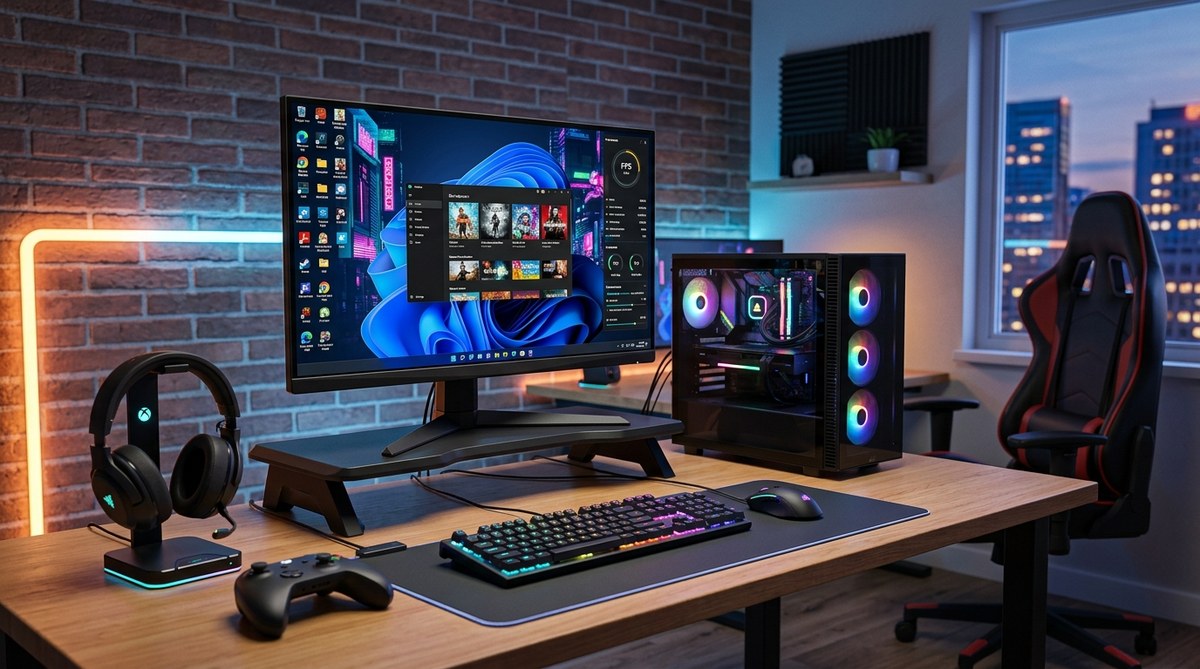
Building a gaming setup without breaking the bank is easier than you might think. With a little planning and smart shopping, you can create an immersive, functional environment for under $1000. Whether you’re new to gaming or upgrading your current setup, this guide shows you how to select the right gear, avoid common mistakes, and maximize your budget. Let’s jump into making your dream gaming space a reality without overspending.
Creating a quality gaming setup under $1000 involves choosing the right monitor, a capable but affordable PC or console, reliable peripherals, and smart space organization. Focus on balanced components, avoid unnecessary extras, and shop wisely to get the best performance for your budget.
Planning Your gaming setup on a budget
Before diving into purchasing, take a moment to plan your ideal gaming environment. Knowing your priorities helps you allocate funds effectively. Decide whether your focus is on high frame rates, a stunning visual experience, or a comfortable space for long gaming sessions. Remember, building a setup under $1000 means balancing components rather than chasing the latest high-end gear.
Choosing the right hardware for your budget
Gaming PC or console? Your options
If you prefer flexibility and upgrade potential, a gaming PC might be your best bet. For casual gaming or limited space, a console like the PlayStation 5 or Xbox Series S provides excellent performance at a lower cost.
Tips for budget-friendly gaming hardware:
- Look for refurbished or slightly older models that still perform well.
- Consider pre-built PCs designed for gaming under $1000, which often include good specs for the price.
- Check out online reviews to compare performance and reliability of different models.
Key components to focus on
If opting for a custom PC build, prioritize these hardware elements:
| Technique | Mistake to Avoid |
|---|---|
| Invest in a solid GPU within your budget | Overspending on CPU while skimping on graphics |
| Choose a balanced CPU like AMD Ryzen 5 or Intel Core i5 | Going for the latest high-end CPU which can blow your budget |
| Opt for 8GB or 16GB RAM | Underestimating RAM needs for gaming |
| Use a reliable SSD for fast load times | Skipping storage or settling for HDD only |
Expert tip: “A good GPU is crucial for gaming. Pair it with a decent CPU and enough RAM to avoid bottlenecks,” advises gaming tech reviewer Alex Johnson.
Finding the perfect monitor and peripherals
Display considerations
A good monitor enhances your gaming experience without requiring a high price tag. Look for:
- 24 inch size for a balance of immersion and desk space
- 1080p resolution for clear visuals
- A refresh rate of at least 75Hz, ideally 144Hz for smoother gameplay
- Low response time to reduce motion blur
Peripherals that won’t break the bank
- Mechanical keyboards may be tempting but a high-quality membrane keyboard can work fine for gaming
- Gaming mice with adjustable DPI are affordable and improve precision
- Good quality headphones or speakers for immersive sound
Tips for saving money
- Buy peripherals during sales or from reputable discount outlets
- Consider secondhand options for higher-end gear
- Focus on essentials first, then upgrade over time
Setting up your space for comfort and efficiency
A well-organized space prevents fatigue and improves your gaming experience. Use:
- A sturdy desk with enough space for your monitor and peripherals
- An ergonomic chair to support long sessions
- Cable management tools to keep everything tidy
- Proper lighting to reduce eye strain
Avoiding common pitfalls in budget gaming setups
| Technique | Mistake to Avoid |
|---|---|
| Over-investing in peripherals at the expense of core hardware | Skimping on the main components like GPU or CPU |
| Not researching compatibility | Buying parts that don’t fit or work together |
| Ignoring future upgrade paths | Choosing parts that can’t be upgraded later |
| Buying from unreliable sources | Risking counterfeit or defective gear |
Remember: “Prioritize your hardware needs first. Peripherals can be upgraded later,” notes tech enthusiast Lisa Chen.
Practical steps to assemble your gaming setup
- Define your budget and priorities. Decide what matters most—graphics, performance, or comfort.
- Research components and peripherals. Use trusted review sites and compare prices.
- Purchase parts from reliable sources. Look for discounts, bundles, or refurbished items.
- Assemble your setup step-by-step. Follow tutorials if needed, and double-check compatibility.
- Optimize your environment. Arrange furniture and lighting for comfort and focus.
Techniques and mistakes at a glance
| Technique | Mistake |
|---|---|
| Prioritize GPU and CPU balance | Overspending on one component while neglecting others |
| Shop during sales and clearance | Buying full price without comparison |
| Use multi-purpose furniture | Sacrificing ergonomics for space or cost |
Setting realistic expectations
While a $1000 budget limits some options, it doesn’t mean you can’t enjoy excellent gaming. Focus on getting the best performance within your means. Over time, you can upgrade individual parts or peripherals. Patience and research will yield the best results.
“A well-balanced setup and smart shopping make all the difference,” shares gaming setup specialist Mark Rivera.
Making your gaming space your own
Personalize your environment with posters, LED strips, or themed accessories. A cozy, organized space boosts your motivation and enjoyment. Remember, comfort and aesthetics matter just as much as hardware.
Final tips for a successful build
- Keep an eye on seasonal sales and bundle deals
- Join online communities for advice and secondhand deals
- Don’t rush your purchase; compare options carefully
- Invest in quality cables and accessories to prevent issues later
Crafting your gaming haven without overspending
Building a gaming setup under $1000 is all about focus. Pick components that match your gaming style and future plans. Use the right peripherals and organize your space thoughtfully. With patience and planning, you can create a setup that delivers great visuals, smooth gameplay, and comfort, all within your budget.
Creating a gaming environment that feels right takes time and attention. Start with the essentials, upgrade gradually, and enjoy your gaming sessions more than ever. Your perfect setup awaits—just plan it smartly and get started today.

Post Comment